
Loox is a Shopify app that collects photo and video reviews from your customers and shows them on your store in widgets. It sends review requests by email, can reward photo reviews with a discount, and adds AI tools that sort and summarize reviews on its paid plans. It launched on the Shopify App Store in October 2015.
A photo from a real buyer answers what a studio shot can’t: how it fits, how big it is, how it looks after a month. I checked Loox’s App Store listing, its pricing page and both help centers on November 18, 2026, so the plans and steps below are current as of that date.
If you build pages with Zipify Pages, there’s also a built-in Loox block. I cover how it works, its one limit, and the workaround for other Loox widgets.
TL;DR
- Loox collects photo and video reviews, then displays them in widgets on Shopify product, home and landing pages.
- The free Beginner plan covers up to 500 orders; paid plans start at $49.99 a month.
- Loox’s Convert plan grows by $50 for every extra 300 orders, so check your monthly order count before you pick a plan.
- Zipify Pages has a Loox block, limited to one per page, that shows reviews for the product you pick.
- Put photo reviews next to the decision point on a page, not only at the bottom.
What Does Loox Do on a Shopify Store?
Loox handles three jobs: it asks buyers for reviews, it displays those reviews, and it reuses them in other channels. Everything starts from your Shopify orders, so Loox only works on Shopify stores.
Collecting reviews. Loox sends review request emails and reminders after an order. It can also collect through QR codes and review links, and offer a discount code to buyers who add a photo. The listing also mentions migration from other review apps.
Displaying reviews. The free plan includes 17+ widgets, such as snippets, carousels and star ratings, plus Google rich snippets for SEO. Video reviews, reviews on product bundles and the AI features (smart sorting, review highlights, summaries, translations and suggested replies) start on the Convert plan.
Reusing reviews. Loox syncs reviews to the Shop app on every plan. Google Shopping, Meta and TikTok syndication, plus a referral program, sit on paid plans. A tool called Loox Studio turns reviews into social posts and stories.
How Much Does Loox Cost in 2026?
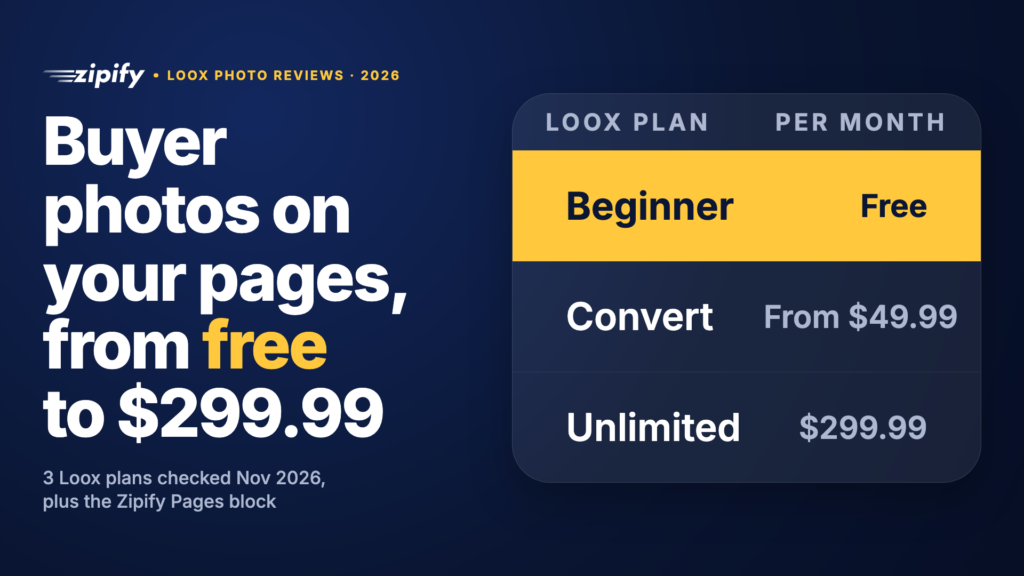
Loox has three plans: Beginner is free, Convert costs $49.99 a month and Unlimited costs $299.99 a month. Paid plans come with a 14-day free trial, and Shopify bills charges every 30 days in USD. The catch sits in the middle plan: Convert includes 300 orders, then adds $50 for each additional 300.
Scroll sideways for more →
| Plan | Monthly price | Order limit | What it adds |
|---|---|---|---|
| Beginner | Free | Up to 500 orders | Review emails and reminders, photo-review discounts, 17+ widgets, rich snippets, Shop app sync |
| Convert | $49.99 | 300 orders included, then $50 per extra 300 | AI sorting, highlights, summaries and translations, video reviews, referrals, Google/Meta/TikTok syndication, API access |
| Unlimited | $299.99 | Unlimited | Everything, plus priority support |
Source: Loox’s Shopify App Store listing (the order add-on terms) and Loox’s pricing page (tiers and features), both checked November 18, 2026.
The order-based add-on is the part most reviews skip, so I worked out what Convert costs at a few order counts, straight from the listing’s terms:
- Up to 300 orders: $49.99
- 301 to 600 orders: $99.99
- 901 to 1,200 orders: $199.99
- 1,501 to 1,800 orders: $299.99, the same as Unlimited
Past 1,800 orders a month, Unlimited is the cheaper plan. Below 300, Convert is the flat $49.99 most comparison posts quote. Order-based billing is also the complaint I found among recent App Store reviews: an October 2026 reviewer said charges tied to order counts surprised them, and Loox replied that its pricing is listed on its site, in the listing and in the app.
Why Do Photo Reviews Matter for Conversions?
Shoppers now look for buyer photos before they buy, and many won’t buy without them. PowerReviews surveyed nearly 16,000 US consumers for its 2024 visual content report and found:
- 60% always search for customer photos or videos before buying, up from 50% in 2021.
- 91% are more likely to buy a product whose reviews include photos and videos.
- 23% won’t buy a product with no customer photos or videos at all.
- 84% want those visuals on the product page itself.
In the same report, shoppers said they want to see the product in real life (89%) and judge its size (72%). A text review can’t do either, which is why I’d treat photo reviews as page content, not a widget parked in the footer.
How Do You Add Loox Reviews to a Zipify Page?
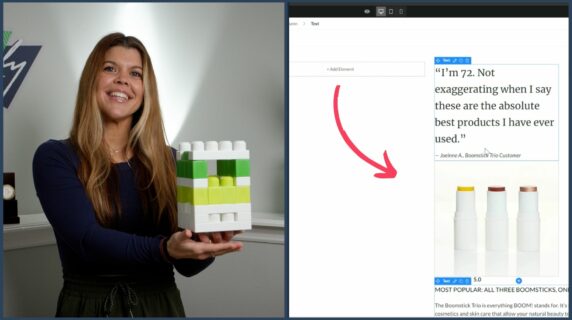
Zipify Pages has a Loox Reviews block in its Plugins category, so you can add a product’s Loox reviews to a page without code. Loox has to be installed and set up on your store first, and each page can hold only one Loox Reviews section or element.
Here are the steps from Zipify’s help article on the Loox block, which match Loox’s own Zipify guide (updated November 2, 2026):
- Install Loox from the Shopify App Store and finish its setup.
- Open your page in the Zipify Pages builder.
- Add the Loox Reviews section from the Plugins category. Or, inside an existing section, click “add element” and pick Loox.
- Click the element, choose Add Product, select the product whose reviews you want and save.
- Publish or update the page. The reviews widget shows on the live page only, not in the builder.
New reviews then appear on the page on their own, or wait in your Loox admin for moderation, depending on your Loox settings.
Need a different Loox widget? The block shows a product’s reviews widget. Loox says other widgets, such as a carousel, can go into a Zipify page through an HTML element. Zipify Pages also has a Shopify App Block element that places any app block from your theme editor on product, collection, landing and home pages. Those pages then publish with their own JSON template.
Try Zipify Pages free for 14 days
Building a landing page around your best reviews? Plans start at $19 a month.
Where Should Photo Reviews Go on a Landing Page?
Put photo reviews where the shopper makes the decision: near the price and the add-to-cart button, and again after any claim a buyer might doubt. A reviews section only at the bottom of a long page gets seen by the fewest people.
Three placements I’d test first on a Zipify page:
- Under the buy box. A short strip of photo reviews right below the price answers “is it worth it?” at the moment of choice.
- After a sizing or results claim. If the copy says “fits true to size” or “visible results in 4 weeks,” a buyer photo right after it backs the claim up.
- A full reviews section before the final call to action. Shoppers who scroll this far are still deciding, so give them the full gallery.
With one Loox Reviews block per page, give it the spot that matters most and use an HTML element for a second widget. For more placement ideas, Zipify’s guide to 11 places to put reviews and UGC lists tests by page type.
If you’d rather use a different review app, Zipify Pages also has blocks for Judge.me, Yotpo, Stamped.io and Opinew. Our Judge.me integration post shows that setup.
The Bottom Line
Loox is a photo-first review app for Shopify: it collects reviews with photos and video, shows them in on-brand widgets and reuses them across channels. It fits stores that sell products shoppers want to see on a real person or in a real room, such as apparel, beauty and home goods.
Start on the free Beginner plan if you’re under 500 orders, and run the order math before moving to Convert, because the price climbs by $50 with every extra 300 orders. On Zipify Pages, the Loox block takes about a minute to add: install Loox, drop the block in, pick the product, publish.
Reviews build trust on the page. What the shopper adds to the order next is a separate lever, and that’s the job of OneClickUpsell (OCU), Zipify’s upsell app.
Frequently Asked Questions
Is Loox free?
Yes, Loox has a free Beginner plan. It covers up to 500 orders and includes review request emails and reminders, discounts for photo reviews, 17+ widgets, Google rich snippets and Shop app sync. Video reviews, AI sorting and summaries, referrals and Google Shopping syndication need a paid plan, which starts at $49.99 a month with a 14-day free trial.
How much does Loox cost per month?
Loox costs nothing on Beginner, $49.99 a month on Convert and $299.99 a month on Unlimited, per its Shopify App Store listing in November 2026. Convert includes 300 orders and adds $50 for each additional 300, so a store with 1,000 orders a month pays $199.99. Above 1,800 orders a month, the Unlimited plan costs less than Convert.
Is Loox legit?
Yes. Loox is an established Shopify review app: it launched on the Shopify App Store on October 16, 2015, and its listing carries Shopify’s “Built for Shopify” badge, which Shopify gives to apps that meet its standards for performance, design and integration. One complaint in recent App Store reviews is order-based billing on the Convert plan, so check your monthly order count first.
How do I add Loox reviews to a Zipify page?
Install and set up Loox on your Shopify store first. In the Zipify Pages builder, add the Loox Reviews section from the Plugins category, or add a Loox element inside an existing section. Click it, choose Add Product, pick the product and save. The reviews appear once you publish the page. Each page can hold one Loox Reviews block.