
Every Shopify store runs on words: product descriptions, collection pages, emails, ads and the offer in the cart. If you write them between packing orders and answering tickets, the thin ones never get fixed. Shopify copywriting with AI solves that, as long as AI is your first-draft writer: one job, the right inputs and a length limit per prompt, then a fact-check and a test.
For this guide I went through Shopify’s help docs for its built-in AI, read the largest field experiment on AI-written product descriptions so far, and asked six AI assistants how merchants should do this.
Key Takeaways
- AI-written product descriptions lift sales most where the current copy is thin or missing, so start with your weakest product pages.
- Shopify’s built-in AI, Sidekick, writes product descriptions, blog posts, email copy and page text inside the admin.
- Give AI one copy job per prompt, with your product facts, your voice rules and a length limit.
- Fact-check every draft: AI can add benefits, specs and claims your product doesn’t have.
- Test AI copy against your current copy one variable at a time, using the number that copy is meant to move.
What Is Shopify Copywriting?
Shopify copywriting is writing the words on a Shopify store and its marketing that move a shopper to buy: product descriptions, collection and home pages, emails, ads, and cart and upsell offers. It’s the same craft as ecommerce copywriting, done inside Shopify’s fields, templates and character limits.
Good store copy is specific (the sock is 80% merino, not “premium”), accurate, and written in the words customers use about their problem. Accuracy is the part people skip, and it costs sales: in Salsify’s 2025 consumer research, 54% of shoppers dropped purchases due to conflicting information.
Copy also lives in more places than the product page: collection intros, home page headlines, email subject lines, ad hooks, and cart and post-purchase offers. Long-form pages follow the same rules with more room, and Zipify’s guide to landing page copy that converts covers that structure.
Does AI-Written Copy Actually Sell?
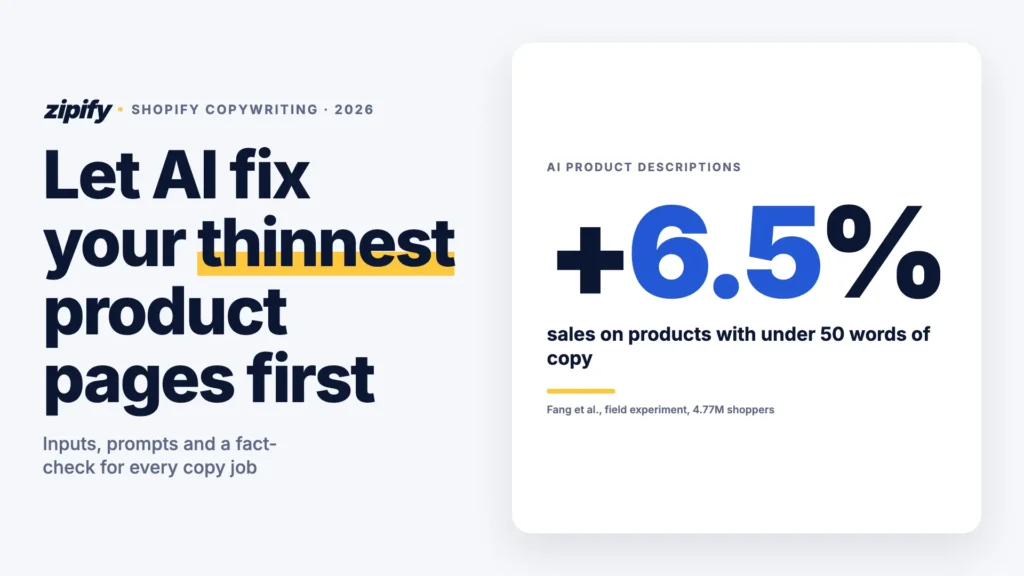
AI-written product copy can sell, mostly where your current copy is weak. In a field experiment across about 4.77 million shoppers in December 2023, adding AI-generated product descriptions raised sales 2.1%. Products with no description or one under 50 words saw a 6.5% sales lift, while products with detailed descriptions showed no significant increase.
That study, Generative AI and Sales Productivity by Fang, Yuan, Zhang, Donati and Sarvary (revised June 2026), ran on a large cross-border online marketplace, not on Shopify, and added the AI text to the existing description for around 45,000 products. The same paper found AI-written advertising titles had no statistically significant effect. So the honest version of “AI writes better copy” is narrower: AI fills gaps well, and it doesn’t automatically beat copy that already works.
Shoppers notice. Klaviyo’s 2026 AI Consumer Trends Report found that only 13% of consumers completely trust AI, so copy that reads like a template costs you trust.
My takeaway for a small store: list the product pages with fewer than 50 words of description, hand those to AI first, and edit every draft in your own voice.
What Can Shopify’s Built-In AI Write For You?
Shopify’s built-in AI is Sidekick, and it writes text in the admin: product descriptions, blog posts, email copy, online store pages and theme editor content. If you know the name Shopify Magic, shopify.com/magic now redirects to the Sidekick page (checked November 6, 2026), and the help docs call the writing tools Sidekick.
What Shopify’s help docs say per copy job:
- Product descriptions. Click the “Generate text” icon in the description toolbar and give it at least a title plus 2 product features or keywords. Set the tone in your prompt. It works in every language Shopify supports, but not in the iPhone or Android app.
- Email. In Shopify Messaging, the same icon suggests subject lines and body text.
- Pages, blogs and theme text. Sidekick can write and edit text for your store, from a 600-word blog post to page content.
The same docs warn that generated text can include product benefits “even when you didn’t list any explicitly”, which is why the fact-check below isn’t optional. For everything else Sidekick does, read Zipify’s full guide to Shopify Magic and Sidekick.
The Copy Job Card: What Does Each Copy Job Need From You?
Each copy job needs its own input, length and check. I call this the Copy Job Card: one row per job, built from Shopify’s help docs, with my own starting limits where Shopify doesn’t set one.
Scroll sideways for more →
| Copy job | Where to write it in Shopify | Minimum input | Starting length | Check before publishing | Number to watch |
|---|---|---|---|---|---|
| Product description | Products → product → Generate text | Title + 2 features, customer, tone | 80–150 words | Every spec and benefit is true | Conversion rate |
| Benefit bullets | Product description or theme block | 5 features + who it’s for | 5 bullets, under 12 words each | No duplicate claims | Conversion rate |
| Collection intro | Collections → description | Collection theme, 3 best sellers | 40–60 words | Matches the products shown | Clicks to products |
| Home or landing headline | Theme editor or page builder | Offer, audience, main benefit | Under 10 words | Promise matches the page | Bounce rate |
| Email subject line | Messaging → Subject field | Campaign type, product, offer | 3 options under 50 characters | Offer and dates are right | Open rate |
| Email body | Messaging → text editor | Goal, product, discount, deadline | 3–5 sentences + 1 CTA | Links and codes work | Click rate |
| Ad hook | Your ad tool | Product, problem, angle | Under 15 words | No claims you can’t prove | Click-through rate |
| Upsell or cross-sell offer | Your upsell app | First product, offer product, price | Headline under 12 words | Price and discount are right | Acceptance rate |
| Product FAQ | Product page block | Specs, shipping, care, top questions | 5 questions, 2–3 sentences each | Answers match your policies | Support tickets |
Built from Shopify’s help docs (checked November 6, 2026). The 50-character subject line is Shopify’s example; the other lengths are starting points to adjust after your first test.
The 50-character subject line comes from Shopify’s own example prompt; the other lengths are my starting points, so adjust them after your first test.
How Do You Write A Brand-Voice Brief AI Can Follow?
A brand-voice brief is a short block you paste above every prompt so AI writes like your store, not like everyone’s. It has 4 parts (role, context, constraints, style) and 3 raw materials: copy you like, words you never use, and real customer phrases.
The raw materials do more than adjectives. “Friendly and bold” means little to a model; three paragraphs of your best email and ten phrases from your reviews mean a lot, because customers use words you’d never write yourself.
You are the copywriter for {store name}, a Shopify store selling {products} to {customer}. Context: {2–3 facts that make the products different}. Voice: {3 words}; match these examples: {paste 2–3 paragraphs of your best copy}. Use these customer phrases where they fit: {5–10 phrases from reviews or tickets}. Never use: {words you hate}. Never invent specs, ingredients, certifications, reviews or discounts. If a fact is missing, write [ADD FACT].
Want a formula? Add “structure it as problem, agitation, solution” (the PAS formula most copy guides teach). Save the brief as custom instructions in your AI tool so you write it once.
What AI Prompts Work For Each Shopify Copy Job?
Paste your brand-voice brief first, then one of these prompts. Each has one job, a length limit and a “use only my facts” line, because those three lines do most of the quality work. Replace everything in {braces}.
Product description
Write a product description for {product title}. Features: {at least 2}. It’s for {customer} who wants {outcome}. Lead with the main benefit, then 2 short paragraphs, under 150 words. Use only the facts I gave you.
Benefit bullets
Turn these features into 5 benefit bullets for {product}: {features}. Each bullet starts with what the customer gets, under 12 words. No bullet repeats another.
Collection page intro
Write a 50-word intro for our {collection name} collection, which includes {3 best sellers}. Say who it’s for and what to look at first.
Email subject lines
Give me 3 subject line options, each under 50 characters, for a {sale / launch / restock} email about {product}. Offer: {offer and end date}. One curiosity, one urgency, one plain benefit.
Abandoned-cart email
Write an abandoned-cart email for someone who left {product} in their cart: 3 short sentences, one quote from these reviews {paste 2 real reviews}, one button. No discount unless I give you one: {code or “none”}.
Ad hooks by angle
Write 5 ad hooks for {product}, each under 15 words, each from a different angle: the problem, the result, a surprising fact, a customer quote, a comparison with what they use now. Use only these facts: {facts}.
FAQ from product specs
Build a 5-question FAQ for {product} from these specs and policies: {paste}. Answer each in 2–3 sentences, covering fit, shipping, returns and care. If the specs don’t answer a question, write [ADD FACT].
For seasonal campaigns, Zipify’s list of AI prompts for every week until Cyber Monday applies the same approach to BFCM offers, emails and ads.
Write page copy with the AI Copywriter, then split-test it
How Do You Write Upsell And Cross-Sell Offer Copy With AI?
AI tools that can draft upsell and cross-sell copy for product pages include Shopify Sidekick, general assistants like ChatGPT or Claude fed with your brand brief, and the AI writing tool inside the offer builder of OneClickUpsell (OCU), where the offer is built. Good offer copy names one product that completes the first purchase, gives one reason, and states the price or discount.
A shopper decides in a second whether an add-on makes sense with what’s in the cart, so I keep offer headlines under 12 words and tie them to the first product (“Your boots will need these: waterproof laces, 20% off”) instead of “You may also like”.
Write 3 upsell headlines under 12 words and one 20-word description for {offer product}, shown to customers buying {first product}. Why it fits: {reason}. Price: {price and discount}. No urgency claims I haven’t given you.
OneClickUpsell (OCU) covers the parts around the words. Its offer builder has an inline text editor with an AI writing tool that drafts offer copy or changes its tone, added in March 2024. Dynamic AI offers choose which products to show, and the Cart Drawer can show up to 8 AI-powered offers. From the Shopify admin, you can also build OCU funnels from Sidekick: it suggests the trigger product, the offer and the discount, and never publishes anything without your approval.
What Does A Good Edit Of An AI Product Description Look Like?
A good edit takes three passes: cut generic adjectives, swap vague claims for facts from your product data, and make room for a phrase your customers actually use. Here’s the pattern on a made-up product (I wrote this example; it isn’t real store data).
Prompt
“Write a product description for Ridgeline merino hiking socks. Features: 80% merino wool, cushioned heel.”
Typical first draft
“Experience unparalleled comfort with our premium Ridgeline socks. Crafted from the finest materials, they keep your feet dry, odor-free and blister-free on every adventure. The perfect choice for outdoor lovers.”
Edited version
“80% merino wool, so your feet stay warm when they’re wet and don’t smell after day two. The cushioned heel takes the pounding on long descents. [One phrase from a real customer review.]”
The draft added three claims nobody gave it (“finest materials”, “blister-free”, “odor-free”), exactly what Shopify’s docs warn about. The edit keeps only what’s true and specific, and leaves a slot for a real customer’s words. Fill it from your reviews, never with an invented quote.
How Do You Fact-Check AI Copy Before It Goes Live?
Fact-check AI copy against 7 things before publishing: specs, benefits you didn’t list, health or legal claims, superlatives, prices and discounts, scarcity and deadlines, and metadata. Each is a place where AI fills gaps with plausible fiction.
- Specs. Compare every number with your product data, size chart and supplier sheet.
- Benefits. Would you defend this one to a customer who emails about it? If not, cut it.
- Health, safety or legal claims. “Hypoallergenic” or “clinically proven” needs proof, or it goes.
- Superlatives. Delete “best”, “only” and “#1” unless you can show the ranking.
- Prices, discounts and codes. Check them against what’s live in Shopify.
- Scarcity and deadlines. “Only 3 left” and “ends tonight” have to be true.
- Metadata. Title tags, meta descriptions, alt text and structured data get the same check.
Ten minutes is cheap next to a return. Salsify’s 2025 research found that 71% of shoppers returned items over inaccurate descriptions. Google’s guidance also says to manually fact-check and review all AI-generated content, warns that mass-producing pages without added value can count as scaled content abuse, and requires AI-generated product titles and descriptions in Merchant Center to be labeled.
How Do You Test AI Copy Against Your Current Copy?
Test AI copy by changing one thing at a time, measuring the number that copy is meant to move, and running the test at least a full week so weekday and weekend shoppers both see it.
- Product page copy: conversion rate and revenue per visitor.
- Email: open rate for subject lines; click rate and revenue per recipient for the body.
- Offer copy: acceptance rate and average order value (AOV).
Keep price, images and placement the same, or you won’t know what won.
Copy tests are easiest where you build the page. Zipify Pages split-tests whole pages or single sections, and its text editor has an AI Copywriter that writes the challenger next to the original (pick a tone, then simplify, shorten or extend); here’s how the Pages AI Copywriter works. Plan limits matter here. Starter: $19 a month, with one split-test page campaign and one section campaign. Advanced: $99 a month, with unlimited split tests. Every plan starts with a 14-day free trial (prices checked November 6, 2026). For offer copy, OCU’s Split Test Dashboard is on every plan.
Which AI Copywriting Tool Should You Use On Shopify?
Start with Sidekick, because it’s already built into your Shopify admin. Add a general assistant for many variants in your voice, and for pages and offers, use the tool where that copy lives.
| Your situation | Tool that fits | Why |
|---|---|---|
| A first draft without adding another app | Shopify Sidekick | Built into the admin; writes descriptions, emails, pages and theme text |
| Dozens of variants in your voice, or review mining | ChatGPT or Claude with a saved brand brief | Long briefs, custom instructions, pasted review exports |
| Page copy you want to split-test | Zipify Pages AI Copywriter | Writes in the page editor; test the page or one section |
| Upsell or cross-sell offer copy | OCU offer builder | AI writing tool where the offer is built; Split Test Dashboard on every plan |
| Product titles and descriptions AI assistants can read | ShopRank AI | Free plan writes AI titles and descriptions for up to 50 products |
The last row matters as more shoppers ask ChatGPT or Gemini what to buy. ShopRank AI scores how well those assistants understand each product page and suggests fixes, and Zipify’s guide to the Shopify product fields AI assistants read explains what they look for.
The Bottom Line On Shopify Copywriting With AI
AI is a fast first draft, not a finished page, and the evidence says it helps most where your copy is thin. Pull your product pages with fewer than 50 words, draft them in Sidekick with a title, 2 features and your brand brief, run the 7-point fact-check, and test the new version against the old one.
Try it on one product page, one email and one offer this week. If you build pages in Zipify Pages, the AI Copywriter and split testing sit in the same editor, which turns Shopify copywriting with AI into a draft, check and test loop you can run in an afternoon.
Frequently Asked Questions
Is AI-generated product copy bad for SEO?
No, not by itself. Google’s guidance treats AI content as fine when it’s accurate and adds value for users, and asks you to fact-check it, titles and meta descriptions included. The risk is mass-producing near-identical pages that add nothing, which can count as scaled content abuse. In Merchant Center, AI-generated product titles and descriptions must be labeled.
Will AI replace Shopify copywriters?
AI replaces a lot of first drafts, but not the judgment around them: knowing the customer, picking the angle, checking facts and deciding what to test. For most small stores, AI plus an owner who edits is enough. A copywriter earns their fee on launches, brand voice work and the pages that carry the most revenue.
Can Shopify’s AI write product descriptions in other languages?
Yes. Shopify’s help docs say automatic product description generation works in all languages Shopify supports, and the text comes back in the language of your prompt. Write the prompt in the language you want, then have a native speaker check the result, because tone and sizing terms vary by market.
How often should you update your Shopify store copy?
Update copy whenever the facts change: a new formula, size chart, price, offer or shipping policy. Beyond that, I’d review your top 10 product pages by revenue once a quarter and rewrite the weakest one, using your newest reviews and support questions. Shopify copywriting gets better with fresh customer language.