
BOGO stands for “buy one, get one”: a promotion where a shopper who buys one item at full price gets a second one free or at a discount. It’s the deal shoppers recognize fastest, which is exactly why it’s easy to run without checking who it rewards.
A “buy one, get one free” banner gives the second unit to everyone who buys, including shoppers who came for one at full price and those who already buy two. Whether a BOGO pays depends on that split more than on the format. Below, I cover the formats, work one store’s numbers, and show how to run a BOGO on Shopify, as a storefront deal or as an offer made after the first unit is chosen.
TL;DR
- BOGO free is 50% off two units, and BOGO 50% off is 25% off two units, but only for shoppers who take both.
- A storefront BOGO discounts every buyer of the product, including people who’d have paid full price.
- Check your last 60–90 days of orders first: the more orders already hold 2+ units, the more of the deal goes to sales you already had.
- Offering the second unit at a discount after the first is chosen keeps the first unit at full price.
What Does BOGO Mean?
BOGO means “buy one, get one.” Merriam-Webster defines it as a sales promotion in which an item is offered free or at a reduced price when another item is bought at full price. You’ll also see BOGOF (buy one, get one free) and “BOGO 50% off” when the second item is half price.
Two details change what the deal means in practice. The second item can be the same product or a different one (“buy a cleanser, get a toner free”). And stores often add “of equal or lesser value,” so the cheaper item is the discounted one. BOGO is retail shorthand rather than slang, common enough that dictionaries list it as a noun (“a BOGO sale”).
What Are the Common BOGO Formats?
Every BOGO format is a discount spread over the units the shopper has to take. Here’s what each one works out to on a $40 product:
Scroll sideways for more →
| Format | What the shopper pays | Effective discount |
|---|---|---|
| Buy one, get one free | $40 for 2 units | 50% off each of 2 units |
| Buy one, get one 50% off | $60 for 2 units | 25% off each of 2 units |
| Buy two, get one free | $80 for 3 units | 33% off each of 3 units |
| Buy one, get one for $10 | $50 for 2 units | 37.5% off each of 2 units |
| Buy one, get a different item free | $40 + the free item | The free item’s price, spread over both |
Effective discount = discount given ÷ full price of all units taken. Example prices are illustrative.
So yes, BOGO 50% off equals 25% off, but only when the shopper takes two. A shopper who wanted one unit pays full price and gets nothing. That’s why BOGO raises units per order where a plain 25% off doesn’t: the discount only unlocks with the second unit.
Who Actually Gets the Discount in a BOGO?
In a storefront BOGO, everyone who buys the product gets the deal. That’s three kinds of shoppers, and only some of them are new sales:
- Shoppers who’d have bought one anyway. They now take two. The second unit is a new sale, but it’s sold at the deal price.
- Shoppers who already buy two. They pay less for the same order. This part of the deal is pure discount.
- New shoppers the deal brought in. These are the sales a BOGO is meant to win.
The deal pays when group 3 and the extra units from group 1 earn more than you give away to group 2. Most BOGO guides price the deal per pair, as if every buyer were new. It’s the same trap behind what blanket discounts really cost: the discount reaches people who didn’t need it. Shopify’s own discount strategy guide (updated July 2026) calls BOGO “a closer, not a retainer” and points it at aging inventory or a launch product.
You can size group 2 before you launch with what I call the full-price buyer check:
- Export the last 60–90 days of orders for the product (Shopify admin → Orders → filter by product → Export).
- Count the orders with 2+ units of it. That share is roughly how much of a storefront BOGO goes to orders that were already that size.
- Check how many of those buyers are returning customers. Returning buyers of a consumable would likely reorder without a deal.
A product that sells mostly as single units to first-time buyers is a good BOGO candidate. A consumable that loyal customers already buy in twos is a poor one.
What Does a BOGO Cost on 100 Orders?
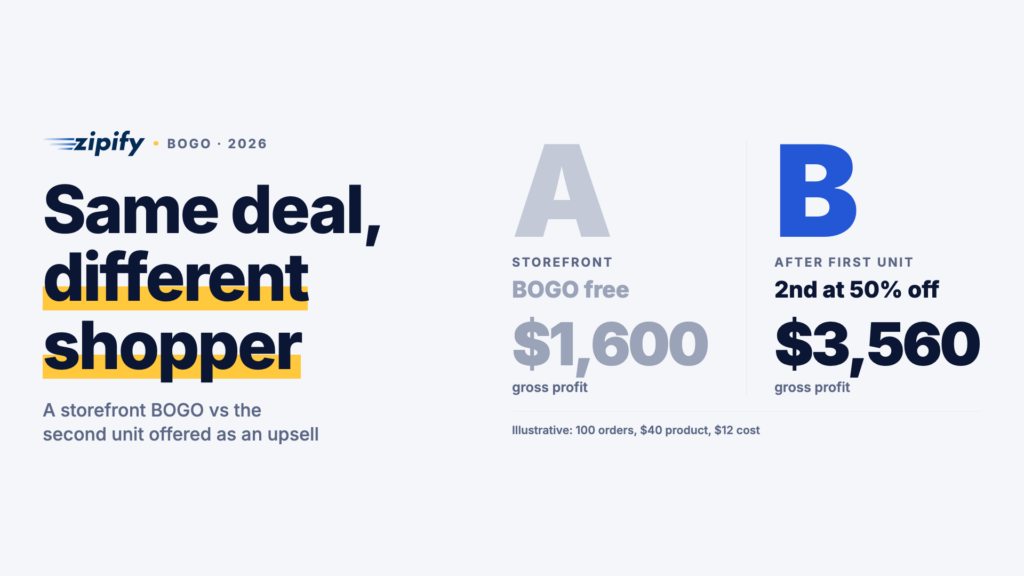
Here’s one illustrative store, not Zipify data: a $40 serum that costs $12 to make, 100 orders a month, 20 of them already with 2 units. Gross profit is revenue minus product cost, before shipping and fees.
Scroll sideways for more →
| No deal | Storefront BOGO free | Storefront BOGO free, 30% more orders | 2nd unit 50% off as an upsell, 25% accept | |
|---|---|---|---|---|
| Orders | 100 | 100 | 130 | 100 |
| Units sold | 120 | 200 | 260 | 145 |
| Revenue | $4,800 | $4,000 | $5,200 | $5,300 |
| Product cost | $1,440 | $2,400 | $3,120 | $1,740 |
| Gross profit | $3,360 | $1,600 | $2,080 | $3,560 |
| Discount given | $0 | $4,000 | $5,200 | $500 |
Assumptions: every storefront BOGO order takes the free unit; the upsell is shown on every order and accepted on 25 of them. Illustrative numbers.
Three things stand out:
- $800 of the storefront deal went to orders that were already paying for two. The 20 two-unit orders dropped from $80 to $40 each.
- The storefront version needs 210 orders to match the no-deal profit. Each BOGO order earns $16, that is $40 minus $24 of product cost, and $3,360 ÷ $16 = 210, a 110% jump in orders.
- The upsell version adds $200 of gross profit with no new orders, because every first unit still sells at $40.
That doesn’t make the storefront BOGO wrong. If you need new customers who’ll reorder, or need to clear stock, paying for reach can be worth it. It just shouldn’t be the default way to sell more units to people already buying.
How Do You Set Up a BOGO on Shopify?
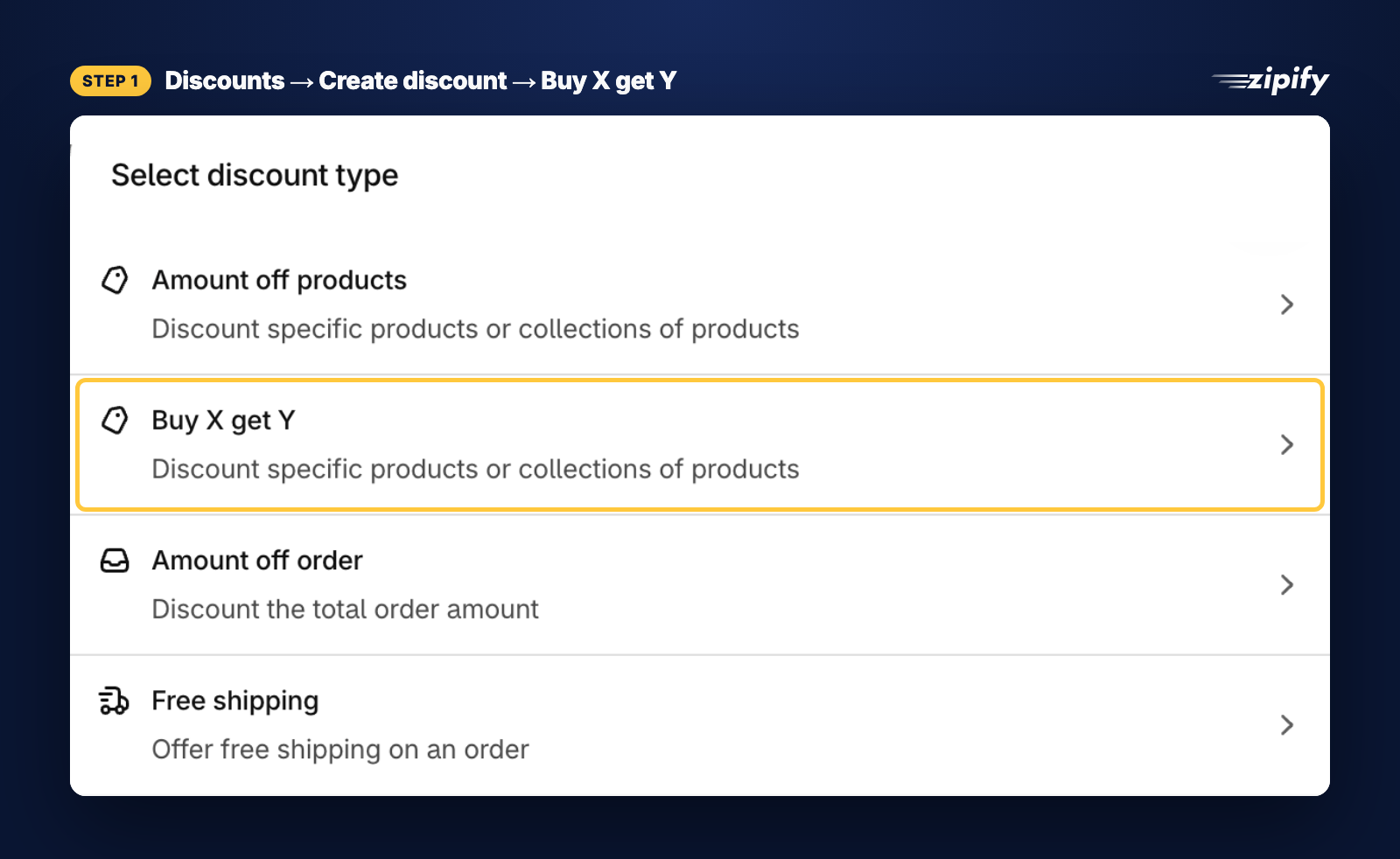
Shopify has BOGO built in as the Buy X get Y discount, so you don’t need an app for a basic one:
- In your Shopify admin, go to Discounts → Create discount → Buy X get Y.
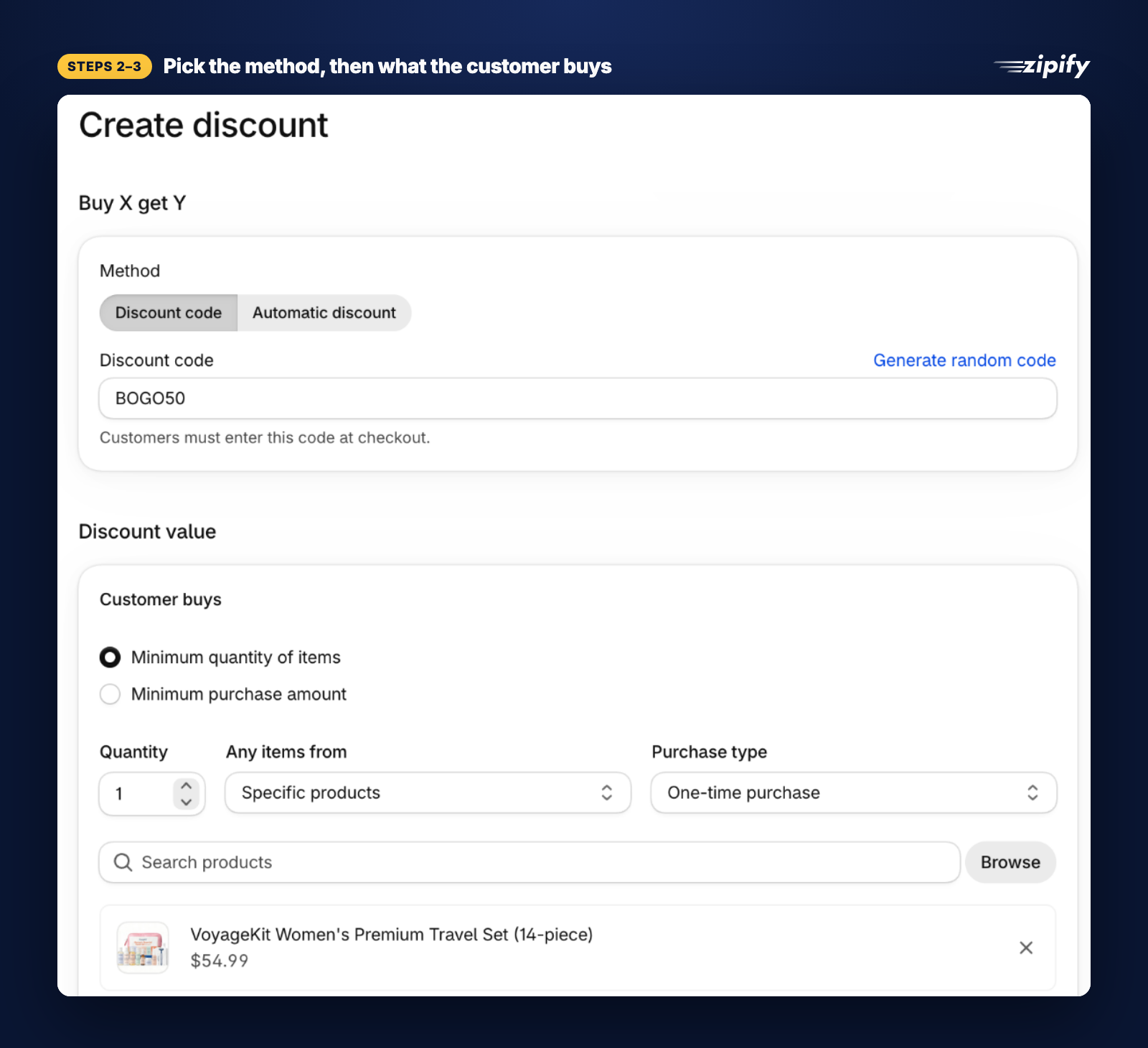
- Choose Automatic discount (applies on its own) or Discount code (easier to track and limit).
- Under Customer buys, set the minimum quantity (1) and the product or collection.
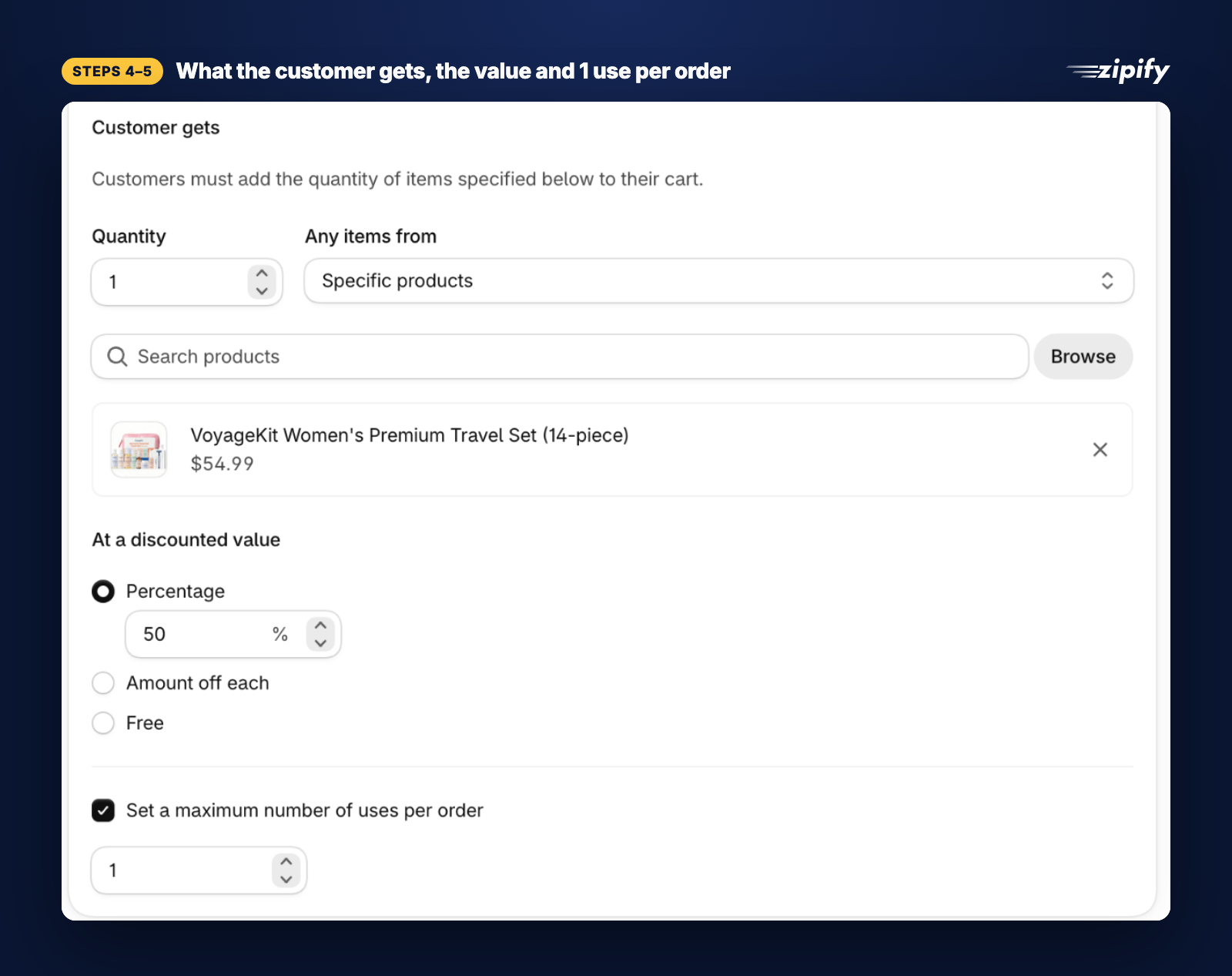
- Under Customer gets, set the quantity (1), the product and the value: Free, Percentage (for example 50%) or Amount off each.
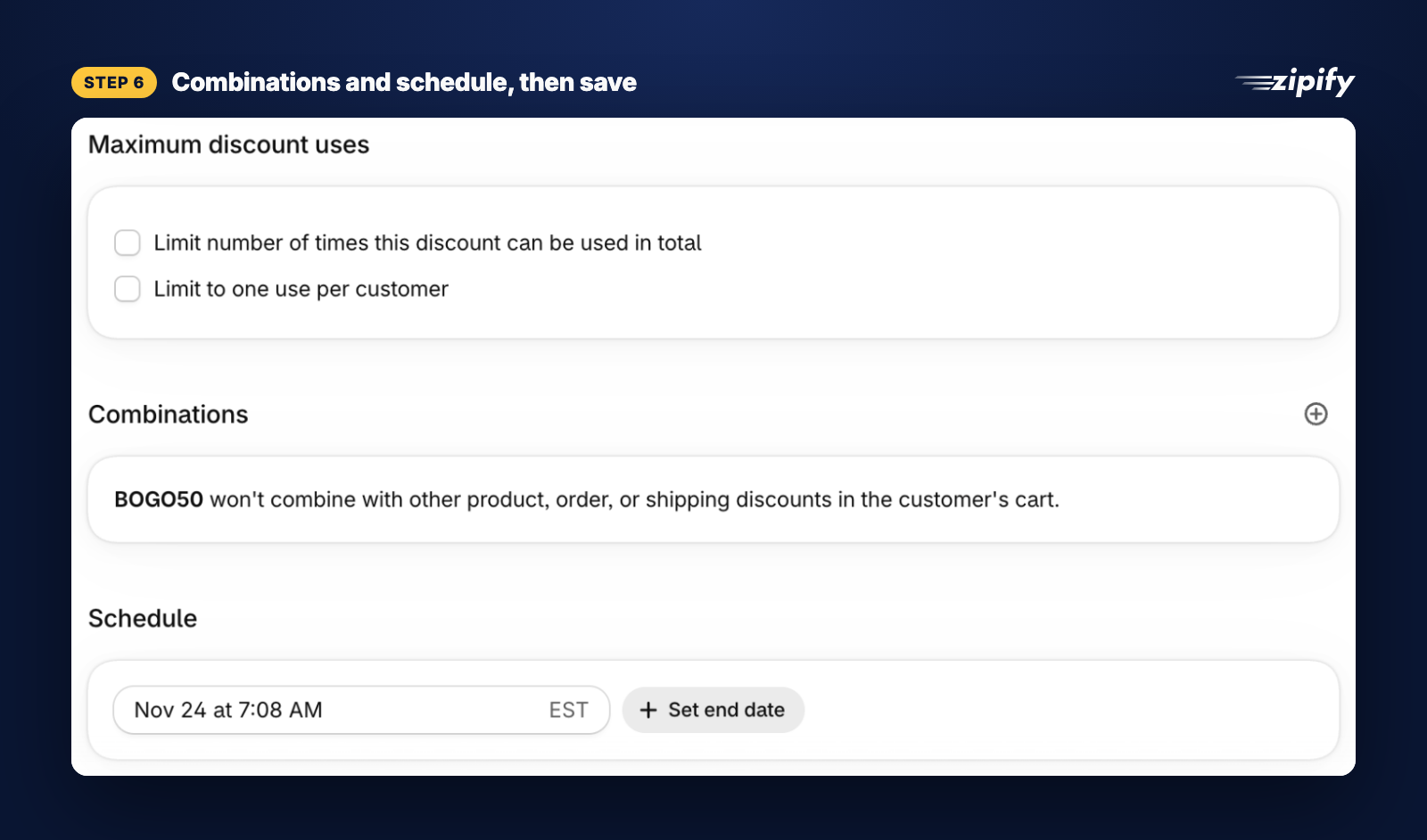
- Check Set the maximum number of uses per order and enter 1, so one cart can’t stack the deal.
- Set Combinations and Schedule (start and end dates), then save and place a test order.
Limits worth knowing, from Shopify’s help center (checked November 2026):
- The free item is never added to the cart for the shopper. They add both items themselves, so say so on the product page.
- Admin-created Buy X get Y discounts don’t apply on the post-purchase page.
- You can have up to 25 active automatic discounts, app-based ones included.
- On every plan except Shopify Plus, products in a Buy X get Y discount can’t take other product discounts.
If you want the free item added to the cart automatically, that’s what free gift and BOGO apps do.
How Do You Run BOGO as an Upsell Instead?
Keep the product page at full price, and offer the second unit at a discount only after the shopper has chosen the first. There are two good moments for it:
- Before checkout. A pop-up or cart offer when the product is added: “Add a second one for 50% off.”
- After checkout. A one-click offer on the post-purchase page, where the shopper accepts without re-entering payment details.
Start with a smaller discount than you’d use on a storefront deal. In Cheech & Chong’s post-purchase test, 15% off converted at 17.95% vs 16.71% for 20% off, and earned more revenue per visit at a better margin.
This is the setup I’d use in OneClickUpsell (OCU), Zipify’s upsell app. Its “Same product as bought” offers do this on both sides of checkout: a pre-purchase pop-up that offers more of the product in the cart, with the discount you set, and a post-purchase page that offers the same product in the same or a different variant. OCU starts at $9.95 a month with a 30-day free trial (prices checked November 24, 2026).
If your BOGO is a storewide event meant to bring in new customers, Shopify’s own Buy X get Y is the right tool, and you can run both.
Offer the second unit after the first is chosen, before or after checkout: try OCU free for 30 days
Which BOGO Should You Run?
Pick the format by what you need the deal to do:
| Your goal | What to run |
|---|---|
| Win new customers during an event | BOGO 50% off or buy two, get one free on the storefront, with Shopify’s Buy X get Y |
| Clear a slow-moving product | BOGO free on that one product, 1 use per order, with an end date |
| Sell more units to people already buying | 2nd unit at 15–50% off as a cart pop-up or post-purchase offer |
| Consumables with many repeat buyers | 2nd unit at a small discount as a post-purchase offer, so full-price reorders stay full price |
What Should You Measure After a BOGO?
Compare the deal period with the 60–90 days before it, on the same product:
- Units per order, to see whether shoppers took the second unit.
- Gross profit per order, since revenue can rise while profit falls.
- New vs returning buyers, to see whether the deal reached anyone new.
- Repeat purchases 30–60 days later, because a break-even BOGO can still pay off if new buyers come back.
Frequently Asked Questions
Is BOGO 50% off the same as 25% off?
Only if the shopper takes both units. Buy one, get one 50% off means paying 1.5 times the price for 2 units, which is 25% off each. A shopper who wants one unit still pays full price, while 25% off applies to a single item. That’s why BOGO raises units per order and a plain percentage discount doesn’t.
Does the free item have to be the same product?
No. In Shopify’s Buy X get Y discount, you choose the “buys” and “gets” products or collections separately, so the free item can be a different product. If both sides use the same collection, Shopify discounts the lower-priced item the shopper picks, which works like “equal or lesser value.”
Does Shopify add the free item to the cart automatically?
No. As of November 2026, Shopify’s Buy X get Y discount never adds the free or discounted item to the cart. The shopper has to add both items, and the discount applies at checkout. Free gift and BOGO apps can add the item automatically if you need that.
Is BOGO better than a percentage discount?
It depends on the shopper and the goal. BOGO only pays out when the shopper takes two units, so it raises units per order. Research in the Italian Journal of Marketing (2025) found that shoppers under financial strain were more likely to use a buy-one-get-one-free deal than a buy-one-get-one-X%-off deal.
The Bottom Line
A BOGO is a discount on two units, and who receives it decides what it costs. Before you put “buy one, get one free” on a product page, run the full-price buyer check on your orders. Use a storefront BOGO when you need new customers or need to clear stock, and offer the second unit after the first is chosen when you want more units from people already buying. Tools like OneClickUpsell make that second version a few clicks.