
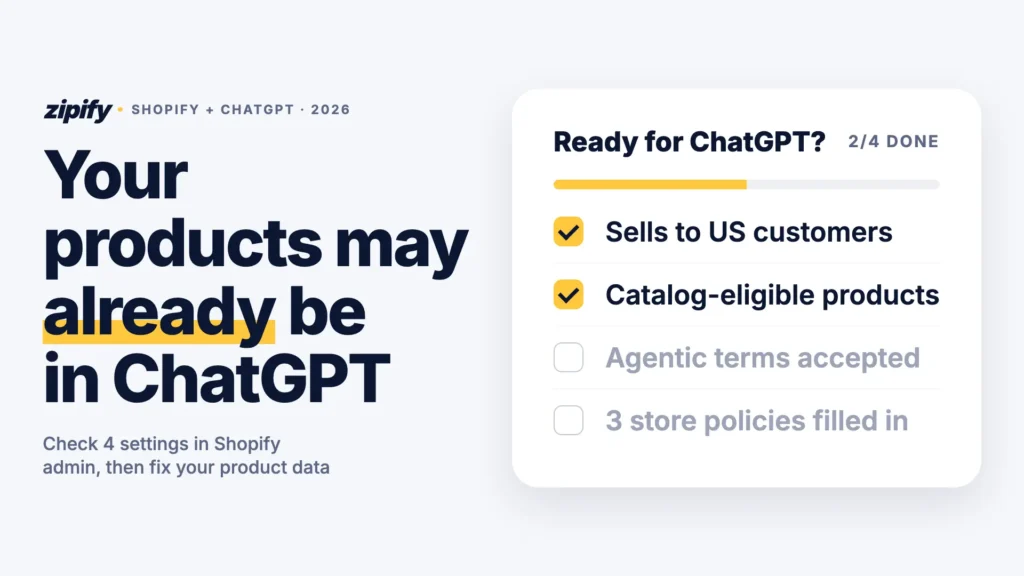
If you sell on Shopify, your products are probably in ChatGPT already. The Shopify ChatGPT integration (Shopify calls it Agentic Storefronts) is on by default for eligible stores, shoppers find your products in the chat, and they pay on your own checkout. There’s no extra fee.
So the job has changed. In October 2025 this post told you to get ready for a “Buy” button inside ChatGPT. That button never reached most Shopify stores, and OpenAI pulled back from it in March 2026. I rewrote this guide from Shopify’s and OpenAI’s current documentation (checked November 6, 2026) to cover what’s live now: how to check your setting, what happens when a ChatGPT shopper clicks through, and what actually gets a product recommended. Being connected and being chosen are two different things, which is also why ChatGPT recommends a competitor instead of you.
Key Takeaways
- Eligible Shopify stores are connected to ChatGPT by default; check Sales channels > Agentic before you change anything.
- ChatGPT shoppers pay on your own checkout, so your checkout speed, payment options and offers decide the sale.
- Inclusion in Shopify Catalog makes a product eligible to appear, not guaranteed to be recommended.
- Clear titles, complete attributes and filled-in policies are the levers you control.
- Track ChatGPT as its own channel for 30 days before you spend money on tools.
What Is The Shopify ChatGPT Integration?
The Shopify ChatGPT integration is the connection that lets ChatGPT show your Shopify products to shoppers and send them to your store to buy. Shopify runs it through Agentic Storefronts and Shopify Catalog, which shares your product titles, descriptions, images, prices and availability with ChatGPT and keeps them updated.
Here’s the catch: people use the same phrase for three different things. When I searched “shopify chatgpt integration” on November 6, 2026, the top results mixed all three.
Scroll sideways for more →
| Integration | What it does | Who it’s for | Where you set it up | Cost |
|---|---|---|---|---|
| Agentic Storefronts (ChatGPT channel) | Puts your products in ChatGPT’s shopping results; buyers check out on your store | Every eligible store | Shopify admin, Sales channels > Agentic | No fee beyond payment processing |
| Shopify plugin for ChatGPT | Lets you run your store from a ChatGPT chat (products, collections, theme tweaks) | You and your team | Installed from ChatGPT, approved in Shopify | No extra Shopify fee |
| ChatGPT Ads for Shopify | Syncs your catalog to ChatGPT Ads Manager for paid product ads | Stores buying ads | ChatGPT Ads app in Shopify | Your ad budget |
Sources: Shopify Help Center (Agentic storefronts, Shopify plugin for ChatGPT) and OpenAI Help Center (ChatGPT Ads for Shopify), checked November 6, 2026
Most of this guide is about the first one, because that’s where your sales come from. The plugin gets its own section near the end. For the paid route, OpenAI says the ChatGPT Ads for Shopify app is available to all US Shopify customers; I covered the groundwork in preparing your catalog for ChatGPT ads.
What Changed Between 2025 And 2026?
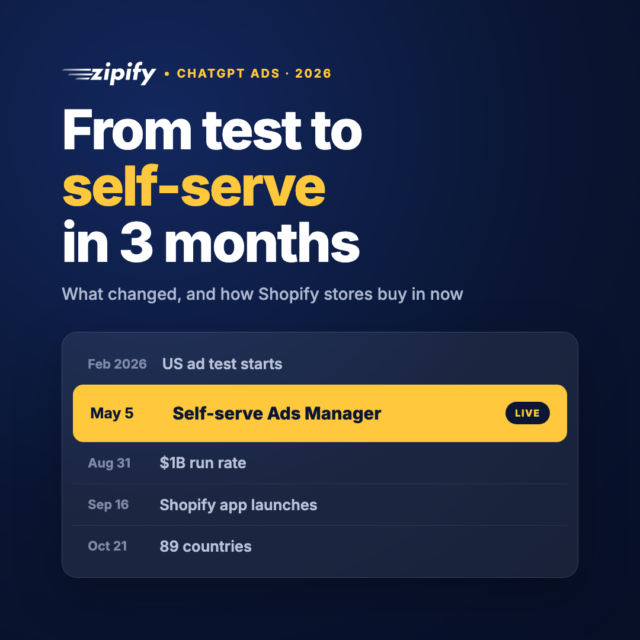
Between 2025 and 2026, ChatGPT shopping moved from an in-chat checkout to discovery plus your own checkout. OpenAI launched Instant Checkout in September 2025, then on March 24, 2026 let merchants use their own checkout instead. The same day, Shopify switched on ChatGPT selling for millions of merchants.
If you read older guides (including the first version of this one), this timeline explains why they don’t match what you see in admin:
Scroll sideways for more →
| Date | What happened | Source |
|---|---|---|
| Sept 29, 2025 | OpenAI launches Instant Checkout: a Buy button inside ChatGPT, starting with US Etsy sellers, built on the Agentic Commerce Protocol (ACP) with Stripe. Shopify merchants are announced as “coming soon” | TechCrunch, Sept 29, 2025 |
| Jan 11, 2026 | Shopify publishes the Universal Commerce Protocol (UCP), co-developed with Google, for AI agents that transact with merchants | Shopify Engineering |
| Mar 24, 2026 | OpenAI shifts its focus to product discovery and lets merchants use their own checkout | OpenAI |
| Mar 24, 2026 | Shopify: “millions of merchants” can now sell to ChatGPT users through Agentic Storefronts | Shopify News |
OpenAI’s own explanation is short. The first version of Instant Checkout “did not offer the level of flexibility that we aspire to provide,” so it now concentrates on helping people compare and choose products, with ACP carrying product feeds instead of payments.
My read: this is good news for Shopify merchants. You keep the customer, the checkout, the data and every rule you’ve already set up. You don’t hand the most important page of your funnel to someone else.
Is Your Store Already Selling In ChatGPT?
Your store is probably already selling in ChatGPT if it meets 4 conditions: it sells to US customers, its products are eligible for Shopify Catalog, you’ve accepted the Agentic Storefronts terms, and your 3 store policies are filled in. Shopify turns the ChatGPT channel on by default for stores that qualify.
According to Shopify’s ChatGPT help page, the store-level requirements are:
- You sell to customers in the United States (your business can be based anywhere).
- Your products are eligible for Shopify Catalog.
- You’ve agreed to the Shopify Agentic Storefronts Supplemental Terms of Service.
- Your Terms of service, Privacy policy and Return and refund policy are complete in Settings > Policies.
Product eligibility is where most stores lose items without noticing. Shopify Catalog’s requirements ask for a title, at least 1 image and a price above $0, and the product has to be published to your online store with a product URL. The store must be on the Starter plan or higher and can’t be in private mode. B2B-only products are excluded, and so are whole categories, such as alcohol, tobacco and vaping, weapons, event tickets and services.
If you sell a restricted category, no setting will change that. Spend your time on the channels and products that do qualify.
How To Connect Shopify To ChatGPT In 5 Steps
To connect Shopify to ChatGPT, open Sales channels > Agentic in your Shopify admin, confirm Shopify Catalog shows your store as eligible, and make sure ChatGPT’s Shopify Catalog access is on. Then fill in your policies and check how your product data is mapped. Most stores only need to confirm, not switch anything on.
- Open Sales channels > Agentic. This is where Shopify manages every AI channel you sell on, according to Shopify’s Agentic home documentation. There’s no app to install.
- Check your Shopify Catalog status. Under Sources > Shopify Catalog, an eligible store shows its product count. If it says “Ineligible”, click it to see the reason and the fix.
- Confirm ChatGPT has Shopify Catalog access. With “Allow Shopify to manage for me” on, ChatGPT is included. Catalog keeps your prices and inventory in sync, so a sold-out variant doesn’t get recommended.
- Complete your policies and accept the terms. Go to Settings > Policies and fill in all 3 required policies. Empty policies are the quietest reason a store isn’t eligible.
- Review product data mapping and your knowledge base. If key details (materials, sizes, compatibility) live in metafields, “Review product data mapping” shows whether Shopify picks them up. The knowledge base, also under Sales channels > Agentic, holds your shipping, returns and brand information so AI channels can answer store questions.
That’s the whole setup. It took me longer to read the documentation than it takes to click through it. The real work is in the product data, which I cover below.
What Happens When A ChatGPT Shopper Clicks Buy?
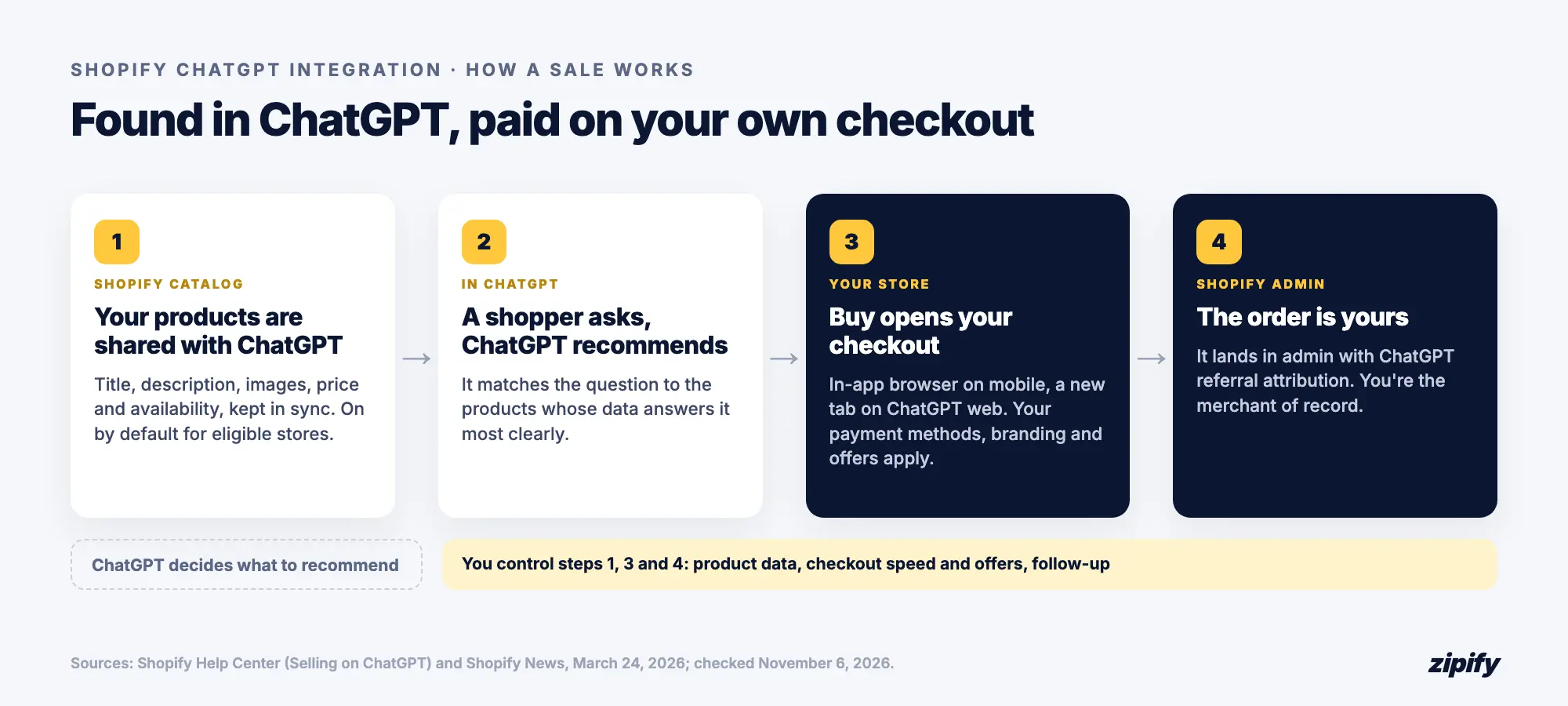
When a ChatGPT shopper clicks to buy a Shopify product, ChatGPT opens your own online store checkout, inside its in-app browser on mobile or in a new tab on ChatGPT web. The purchase happens on your store, and the order lands in your Shopify admin with ChatGPT referral attribution.
Shopify’s help page puts it plainly: “all your customizations, branding, selling strategies, and payment methods are supported.” That’s 2 surfaces to test (mobile in-app browser and desktop tab), and it has three practical consequences.
- Your checkout is now part of your ChatGPT strategy. A shopper who came from a chat recommendation is close to buying. A slow mobile checkout, a missing wallet option or a surprise shipping fee loses them on your page, not in ChatGPT.
- Your rules still apply. Discounts, shipping rates, free-shipping thresholds and checkout customizations work as they do for any other order.
- You’re the merchant of record. The customer, the email address and the post-purchase relationship are yours.
What I’d do this week: place a test order from ChatGPT on your phone. Search for one of your products in ChatGPT, tap through and check out. Watch for 3 things: how fast checkout loads in the in-app browser, which payment buttons show, and whether your thank-you page and any checkout or post-purchase offers appear as expected. If you run offers with OneClickUpsell (OCU) or any other app, this is the order that tells you what ChatGPT shoppers actually see.
How Do ChatGPT, Gemini And Copilot Compare?
ChatGPT is the one major AI channel where checkout always happens on your store. Google AI Mode and the Gemini app, Microsoft Copilot and Meta can use Shopify-powered direct checkout inside the AI channel, if direct checkout is active for your store. All of them pull your products from the same Shopify Catalog.
Scroll sideways for more →
| AI channel | Where the buyer pays | Direct checkout setting | Protocol behind it |
|---|---|---|---|
| ChatGPT | Your online store checkout (in-app browser or new tab) | None for ChatGPT | Shopify Catalog feed (OpenAI uses ACP for other merchants’ feeds) |
| Google AI Mode and Gemini | In the AI channel, if direct checkout is on; otherwise your store | Yes | UCP |
| Microsoft Copilot | In the AI channel, if direct checkout is on; otherwise your store | Yes | UCP |
| Meta | In the AI channel, if direct checkout is on; otherwise your store | Yes | Shopify-powered checkout |
Source: Shopify Help Center, Agentic storefronts and Agentic home, checked November 6, 2026
Shopify Engineering describes UCP as “an open standard for AI agents to connect and transact with any merchant,” built with Google. ACP is OpenAI’s and Stripe’s protocol, and since March 2026 OpenAI uses it mainly for product feeds and promotions. For a Shopify store, the practical difference is small: Shopify handles both, and you manage them from the same Agentic page.
One setting worth knowing: when “Allow Shopify to manage for me” is on, Shopify activates direct checkout for the channels that support it. If you’d rather every AI buyer lands on your own checkout, review that toggle per channel.
How Do You Get Your Products Recommended In ChatGPT?
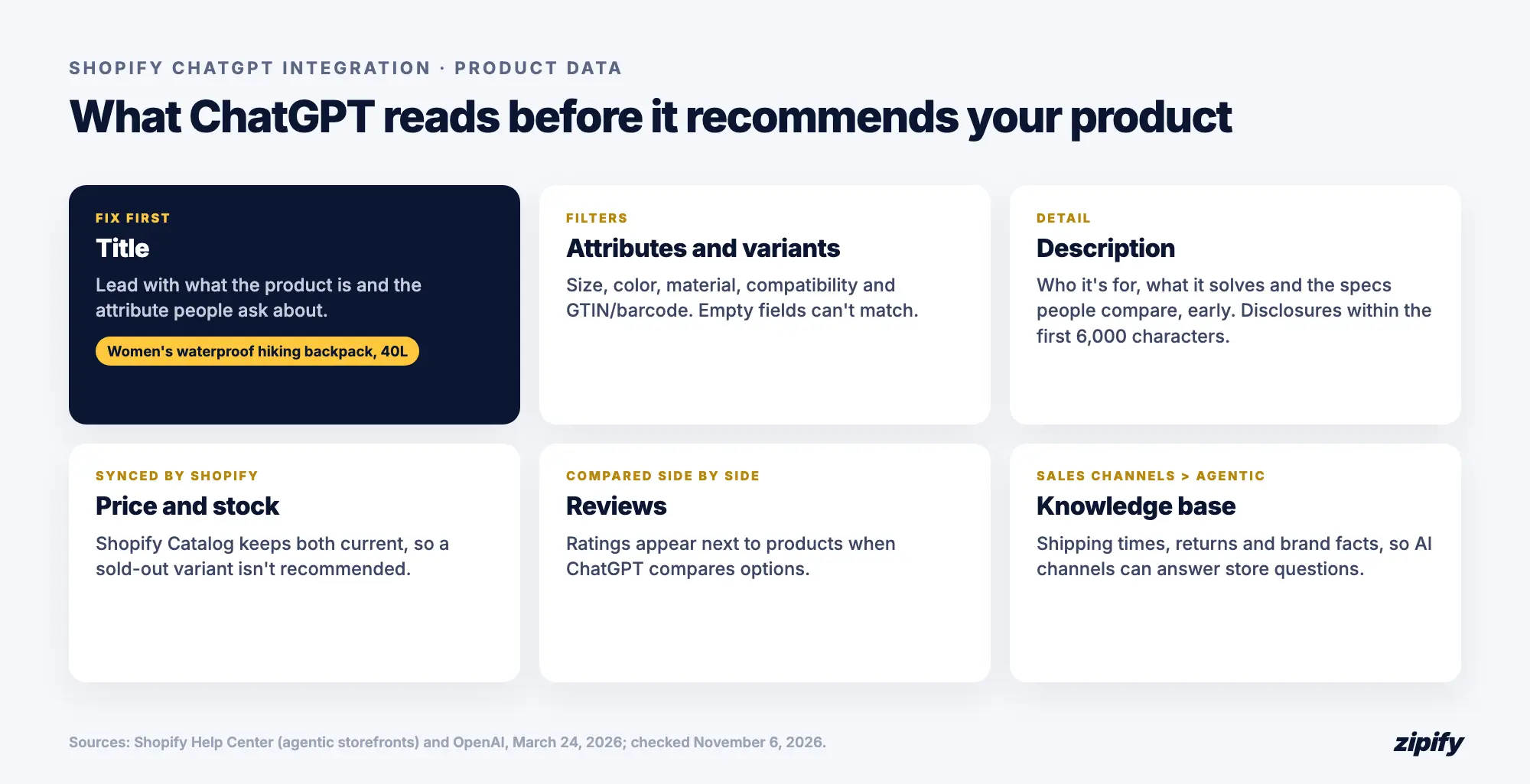
Being in Shopify Catalog makes your products eligible to appear in ChatGPT; it doesn’t make ChatGPT recommend them. ChatGPT matches a shopper’s question (“waterproof hiking backpack under $150 for a 3-day trip”) to the products whose data answers it most clearly. Complete, specific product data is the lever you control.
I asked ChatGPT, Perplexity, Claude and Google’s AI Mode how to get Shopify products recommended in ChatGPT on November 6, 2026. All 4 said the connection itself needs no app, and all 4 pointed to the product data Shopify already sends. Here’s what that means in practice.
Write titles that say what the product is
“The Eclipse” tells ChatGPT nothing. “Women’s waterproof hiking backpack, 40L” matches dozens of real questions. Keep your brand name in the title, but lead with the product type and the attribute people ask about.
Fill every attribute and variant field
Size, color, material, compatibility and GTIN/barcode are how ChatGPT filters. If a shopper asks for an emerald green silk dress and your color field is empty, your dress can’t match, however good the photo is. I go field by field in the 7 Shopify fields AI actually checks.
Put the important details early in the description
Shopify asks merchants to include relevant legal disclosures in the first 6,000 characters of a product description. Treat that as a hint for everything that matters: who the product is for, what problem it solves and the specs people compare, written in plain sentences.
Fill in your knowledge base and collect reviews
Shipping times, return windows and brand facts in the knowledge base let AI channels answer “can I return it?” without guessing. Reviews and ratings show up next to products when ChatGPT compares options side by side.
Test the questions your buyers actually ask
Once a month, ask ChatGPT 5 questions your customers would ask and note who gets recommended. It’s free, and it shows you exactly which products and attributes to fix first.
Do you need an app for this?
No app can guarantee a ChatGPT recommendation; OpenAI selects the results. Perplexity told me to buy a tool only for a clearly named task, and Claude pointed out that most “best AI visibility app” lists are written by the apps themselves. A tool earns its place when you have a specific job: measuring visibility, or fixing data across hundreds of products.
That’s the job ShopRank AI does. It scores each product page’s AI readiness from 0 to 100, ranks the fixes by impact, and on the free plan tracks 3 searches and 1 competitor in AI answers. It’s free to install for up to 50 products, with paid plans from $9.99/month (prices checked November 6, 2026). Here’s how ShopRank AI scores AI readiness. Start with the manual steps above either way; a score only helps if you act on it.
How Do You Track ChatGPT Orders And Sales?
You track ChatGPT orders in Shopify admin: Sales channels > Agentic shows sales, orders, online store sessions and online store conversion for each AI channel, and individual orders carry ChatGPT referral attribution. A free GA4 check (referral traffic from chatgpt.com) gives you a second view.
Shopify reports those 4 metrics per channel, so you can compare ChatGPT with AI Mode or Copilot side by side. Conversion there is sessions that completed checkout divided by sessions.
Give it 30 days before you judge. Note your ChatGPT sessions, orders and conversion rate before you fix any product data, change your top 20 products, then compare. That’s how you find out whether the ChatGPT Shopify integration is worth more of your time, without guessing.
See how ChatGPT reads your products: free for up to 50 products
Can You Manage Your Shopify Store From ChatGPT?
Yes. The Shopify plugin for ChatGPT lets you run parts of your store from a ChatGPT conversation: create products, organize collections, check orders and adjust your theme. It’s separate from selling in ChatGPT, and you install it from ChatGPT, not the Shopify App Store.
Shopify’s plugin documentation gives prompts like “Add 3 scented candles for $24 USD each” and lists clear limits. The plugin can’t change your plan, payments, taxes or domains, and it can’t issue refunds or cancel orders. It works with one store at a time and only within your own access level, which is the right default for a tool that can edit a live store.
When ChatGPT agent shops your store
ChatGPT’s agent mode adds another visitor type: an AI that opens your store in its own browser, clicks through product pages and fills in forms for a user. OpenAI built it to ask the user for permission before consequential steps such as a purchase. You don’t need a setting for it. You need the same things a human shopper needs: clear prices, visible stock, plain policies and a checkout without surprises.
Managing upsells from ChatGPT
If you run OCU, you can also manage upsell funnels from ChatGPT: the OCU AI Assistant works inside ChatGPT to review your funnels and help you build or update offers.
Is Selling In ChatGPT Worth It For Your Store?
Selling in ChatGPT is worth it for nearly every eligible Shopify store, because it costs nothing beyond standard payment processing and Shopify does the connecting. What it costs is attention: product data, a fast mobile checkout and a monthly look at the numbers.
My recommendation is simple. Check one setting today (Sales channels > Agentic). Fix the data on your 20 best-selling products this month. Then measure ChatGPT as a channel for 30 days. If you want a score and a ranked fix list instead of auditing pages by hand, ShopRank AI is built for exactly that.
The Shopify ChatGPT integration made getting connected easy. Getting chosen is still your job, and it happens on your product pages and your checkout.
Frequently Asked Questions
Does selling on ChatGPT cost anything?
No. Shopify says there are no fees for selling in ChatGPT; you pay only your standard payment processing fees on each order. The Shopify ChatGPT integration is included for eligible stores on the Starter plan or higher. Paid ChatGPT Ads are a separate, optional product with their own budget.
Can shoppers pay inside ChatGPT?
Not for Shopify stores today. ChatGPT sends the shopper to your online store checkout, in an in-app browser on mobile or a new tab on the web. Google AI Mode, Gemini, Microsoft Copilot and Meta are different: they can complete the purchase inside the AI channel when Shopify’s direct checkout is active for your store.
Why aren’t my products showing up in ChatGPT?
Start in Sales channels > Agentic. Check whether Shopify Catalog says your store is eligible, then check the product itself: it needs a title, an image, a price above $0 and a product URL, and it can’t be Unlisted or in an excluded category. If everything is eligible, the issue is relevance, so improve the product data.
How do I stop selling on ChatGPT?
Go to Sales channels > Agentic, turn off “Allow Shopify to manage for me”, click ChatGPT, turn off Shopify Catalog access and click Save. Shopify notes it can take up to 7 days for your product data to stop being shared. To hide a single product instead, set its status to Unlisted, which also hides it from search engines.
Do I need Shopify Plus to sell in ChatGPT?
No. Shopify Catalog requires the Starter plan or higher, so the Shopify ChatGPT integration works on any paid plan as long as your store sells to US customers, isn’t in private mode and meets the other eligibility rules. Shopify Plus adds checkout features of its own, but it isn’t a requirement for the ChatGPT channel.